Root and Flashing guide
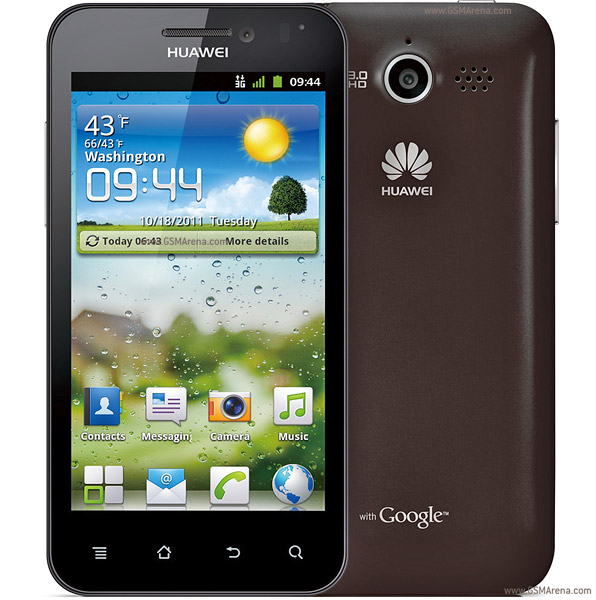
Hi guys,
This is for all the people who want to root their normal Huawei Honor U8860 and flash a custom ROM, which would be currently running either on Ginger Bread or on Ice Cream Sandwich.
I'll be giving you a step by step guide to the whole rooting process for all those who wanna try it.
It's a fool proof method and anyone can do it following this guide.
WARNING:
I'm pretty sure that all you guys know that what you guys are doing are is at you're own risk and you will lose your warranty as soon as you root your phone, but not to worry you can unroot your phone very easily. So everything that you do is by your own will and I cannot be charged guilty if anything shall happen.(Not that anything will go wrong)
OK LET'S START
STEP 1:
DOWNLOADING THE REQUIRED FILES
1.Download the following files to which I will be providing you links with.
1.Official ICS ROM(The only ROM through which you can install Clock Work Mod Recovery)
2.Downgrade Patch (Download Only For Those already on Ice Cream Sandwich)
3.Touch Recovery (Clock Work Mod Recovery For Flashing)
3.Touch Recovery ( Here's another one Just in Case)
Both work just fine, just in case one of the sites don't work i have provided both.
4.Rooting Tool (With this software you can root your Huawei Honor U8860)
5.Huawei Drivers(Install This First)
5.Huawei Drivers(Install This Too)
STEP 2:
FLASHING THE OFFICIAL FIRMWARE
Make sure you always have at least 60% battery
Now we shall begin,
Make sure you have a Micro SD Card inserted in your phone.
First Install the Huawei Drivers given right above both of them.
Then you can take your USB cable and connect it to your phone and to the computer.
Wait for the phone to open up both the Internal Storage and the External Storage
Once its done you will see 2 drives pop up.
Sub-Step 1:
Skip this step if you are running Ginger Bread Currently.
Click on the external memory card and inside it look for a folder named "dload"
Once you find it delete it
Then Extract the contents of the Downgrade Patch(File No:2)
Then Copy the extracted "dload" folder into the SD Card
Now eject the Phone from the computer and then Go to settings and turn of the Fast Boot.
Now Power Off your phone
Now its time for and upgrade
Press the Volume+ and the Volume- and the power button together and hold it for 5 to 10 seconds and the upgrade will start.Just wait for a few minutes and it will finish.
Sub-Step 2:
Now It's time For the real ICS upgrade
Connect your Phone again and go to the SD Card and delete the "dload" folder.
Then extract the contents of the Official ICS ROM(File No:1)
Then put the "dload" folder into the External SD Card.
Now eject the Phone from the computer and then Go to settings and turn of the Fast Boot.
Now Power Off your phone
Now its time for the real upgrade. OH Yeah!
Press the Volume+ and the Volume- and the power button together and hold it for 5 to 10 seconds and the upgrade will start.Just wait for a few minutes and it will finish.
Once its done now your phone will start with the official ICS ROM
Note:Your phone will lose all personal data and the images and the music and the contacts so back it up if you want. But if it's in the External Card not to worry it shall be safe.
STEP-3
Rooting The Phone
Install the Rooting tool(File No:4) into the computer
Now connect your phone and the tool will show give you proper instruction on how to root the phone. Its a simple process Just Click the "Root" Button. Thats all.
Now your phone will restart and it will be rooted with all the super user permissions.
And there you go Step 3 is complete.
STEP-4
FLASHING THE CLOCK WORK RECOVERY
Now So far so good.
Now its time to Install the Custom Recovery(CWM).This will allow you to flash custom ROMS, So you can put jelly bean and kitkat into your Huawei honor.
Ok Let's Begin
Now Connect your phone to the computer and delete the "dload" folder.
Then eject your phone and make sure Fast Boot is off.
Now Turn it off.
Make sure you have the Touch Recovery file ready and extracted(File No:3).
Press the Volume+ and the Volume- and the power button together and hold it for 5 to 10 seconds.
And the colour of your screen will turn pink. But dont worry its not broken, Its completely normal.
So don't freak out.
Once you see the pink, connect the phone to the computer with the USB cable.
And then wait for a while, maybe in a minute a few drives should open up.
This may take some time so have patience.
Once they open up look inside the drive for a folder named "image". Open the folder and you will see a file named "recovery" or it may be "recovery.img"
So now you have to keep this file safe somewhere in your computer just in case you want to switch back to the official recovery. Remove this file and then copy the extracted file that I had mentioned to keep ready.
Now you have to name the recovery file to what ever it was you found in the beginning in the folder, "recovery" or "recovery.img".
Now safely remove the disks. and take the phone out. Now remove its battery. And just turn it on.
That's it now your Recovery has been flashed and you can install any custom ROM you want.
STEP-5
FLASHING CUSTOM ROMS
Now there we go the hardest parts are all complete.
Now you can flash custom roms,custom kernels and sound enhancers, there are a lot of stuff to flash.
I shall show you here how to flash a CUSTOM ROM now
Step 1: Getting into the Custom Recovery(Clock Work Recovery Mod)
Here's how you can get there
Always turn off fast boot.
Then Turn off your phone
Then press the Volume Up and the Power Button together and hold for 5 to 10 seconds.
There you go you will reach the CWRM(Clock Work Recovery Mod)
It will look something like this:

IT'S OK.
Now I shall teach you how to flash a new ROM, The procedure is the same for flashing any ROM.
First what you have to do is Download the ROM and copy it into the SD Card of the phone.
Copy it always into the root* of the SD Card.Also make sure not to extract the zipped file because the ROM must be just the way it is, it should be in ZIP file.(*Root means the putting it into the SD card directly and not inside sub folders)
Ok once this is done you can enter the CWRM using step mentioned above.
Now once you enter the CWRM you will see a screen something like the image shown above.
You can navigate either using the buttons or the touch screen.
Volume up button to 'GO UP'
Volume down button to 'GO DOWN'
Power Button to 'Select'
Step 2: Select 'wipe data/factory reset' then select 'yes'
Step 3: Select 'wipe cache partition' then select 'yes'
Step 4: Navigate to 'advanced' and select it and select 'Wipe Dalvik Cache' and then select 'yes' and also select 'Wipe Battery Stats'
Step 5:Navigate to 'choose zip from sdcard' then you can find your Custom ROM(Its a zip file)
Select the ROM and Choose Install Now.
And there you go the installation will start and it will be over in a around 2 minutes.
Thats the Whole Guide to Rooting and Installing Custom ROM on your Huawei U8860 Honor
Now I will give you a few Custom ROMS to play around with
These are very Stable and Very Nice too
KitKat 4.4.3
KitKat 4.4.2
HellKat - This is a 4.4.2 version of KitKat really smooth really makes your phone look like the devils phone. One of the best ROMS you can find but only a small problem the ringing volume is a little low.
Resurection ROM
Blue Lightning
Heres a small link to help you find a few more ROMS:
http://forum.xda-developers.com/showthread.php?t=2648757
And Here is an MIUI ROM
A very beautiful ROM But not as snappy as KitKat
Lollipop ROMS (not by me)
MIUI
If you wish to stick with the KitKat ROM i shall give you a kernel that is optimized for KitKat so your phone will be performing much better and better battery.
I shall add this kernel if there are any requests.
Feel free to find your own CUSTOM ROMS
These are the most popular ones that everyone likes to use,There are lots of other ROMS out there. But these ones i showed above are fairly stable and risk free.

My android honor in position
ReplyDeleteAndroid 4.0.3
EmoUI 1.0
Baseband 404029
Kernel 3.0.8
B322
Can i follow this step to make kitkat in my honor? Have try flash it, but i can't go to pink screen, why? did i need downgrade it first?
yes
Deleteyou need to downgrade it
I have attached the downgrade file and you should flash the official ICS ROM
Only the official ICS ROM has the capability to enter pink screen mod
Thak you very much! I followed your instructions and everything worked perfect. I think i will choose KitKat 4.4.3 ROM. In this case, i would like to kindly ask you the kernel optimized for KitKat. Best regards!
ReplyDeletei shall put down a link here so u will get all the new updates to the ROMS you can play around with them.
Deletehttp://forum.xda-developers.com/showthread.php?t=2648757
DeleteYou can find Kernels here.
theres no google+ google play store or google play service on the kitkat 4.4.2
ReplyDeleteYou'll have to flash play store
DeleteThis tutorial is the best! The only small problem that my antivirus was angry about the rooting tool, so I had to download another from http://www.kingoapp.com/android-root.htm - this one worked perfectly. Thank you for this tutorial!
ReplyDeleteCasino Bonus Codes 2021
ReplyDeleteThe Casino Bonus Code NJVIP. For all the 토토 사이트 new players, this is one of the งานออนไลน์ best welcome 룰렛 사이트 bonuses in 바카라 그림 New Jersey for new players. The casino has an online sportsbook,